BlueHarvest 8.5 for Mac
BlueHarvest 8.5 for Mac
BlueHarvest is a utility that helps automate the background process of deleting unnecessary files and folders that macOS creates on internal drives, network drives, connected drives, and flash drives.
This program will be useful for those who prefer the option to show hidden and system files. BlueHarvest allows you to specify drives or folders where you don’t want hidden and system files created. (Supports MS-DOS/FAT, ExFAT, and NTFS.)
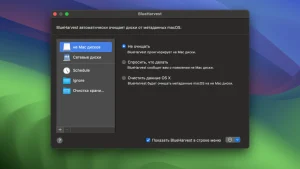
BlueHarvest automatically removes .DS Store and .AppleDouble files from your USB drives, SD cards, music players, file servers, or any non-Mac drive. BlueHarvest removes these items as they are created or modified.
Release notes are available on the official website zeroonetwenty.com >
BlueHarvest 8.5 Keep Your Mac and External Drives Metadata-Free
BlueHarvest is one of the most useful small utilities on Mac for anyone who regularly shares drives with non-Mac systems, manages version control repositories, or simply wants a tidier file system. Version 8.5.0, released on June 2, 2026, by developer Ross Tulloch, brings a set of practical improvements that make the app more reliable and more thorough in what it cleans.
What is BlueHarvest?
Every time macOS creates, copies, or modifies a file on an external drive, it quietly generates invisible metadata files alongside it .DS Store files that store folder view preferences, and .AppleDouble resource fork files that carry extended attributes. On a Mac these are harmless and invisible, but on Windows, Linux, network-attached storage, SD cards, USB drives, music players, and other non-Mac systems they show up as clutter, cause confusion, or even break compatibility entirely. BlueHarvest removes these files automatically and silently as they are created so your drives are always clean without you ever having to think about it.
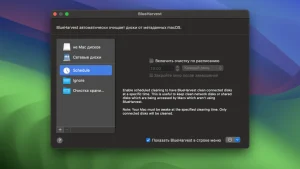
Beyond external drives, BlueHarvest works on internal Mac disks and network volumes too. It runs quietly in the menu bar, monitors connected drives in the background, and cleans up the moment macOS generates unwanted metadata. You can also control-click any folder in Finder to clean it immediately without opening the app. It supports NTFS, ExFAT, and MS-DOS/FAT formatted drives, covering virtually every drive format you might share with non-Mac systems.
What’s New in 8.5
Version 8.5 adds several meaningful improvements. Error reporting is now more detailed when items cannot be deleted, so you know exactly why a file was skipped rather than getting a silent failure. The Clean and Eject feature which cleans a drive and then safely ejects it in one step is now more reliable. Support for deleting MACOSX folders has been added, which are another category of macOS-generated hidden folders that appear on non-Mac systems when files are compressed and shared from a Mac. This option is off by default. System Volume Information folders are also now correctly deleted when encountered.
Storage Cleaner
Version 8 introduced a Storage Cleaner feature that goes beyond metadata files, letting you free up space used by app caches and log files that accumulate on your Mac over time. It gives BlueHarvest a broader role as a general disk hygiene tool rather than just a metadata cleaner.
Pricing
BlueHarvest is priced at $14.95 as a one-time purchase, available directly from zeroonetwenty.com. A free trial is available before buying. It supports macOS 10.15 or later through macOS 26 Tahoe and runs as a Universal Binary on both Intel and Apple Silicon Macs.



About Author
