cyberWriter 3.0 for Mac
cyberWriter 3.0 for Mac
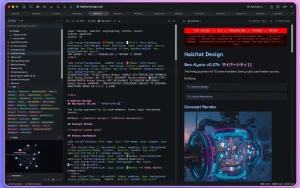
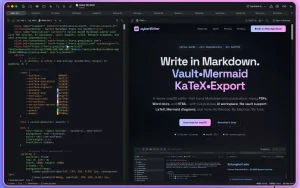
cyberWriter is a fully native Markdown editor built on SwiftUI that turns your Mac into a powerful note-management and document publishing system. Forget cumbersome Electron-based solutions and unreliable plugins. cyberWriter offers a unified environment for writing, organizing, and exporting content, leveraging the capabilities of the latest macOS versions.
Peculiarities:
Fully native: The app is written in SwiftUI, which guarantees excellent performance, low resource consumption, and perfect integration with macOS.
Built-in AI: Works with Apple Intelligence (macOS 26+ without configuration) or any other operating system (Ollama, LM Studio, Claude, OpenRouter). Features include: chat with context for the entire folder (“storage”), streaming text generation (⌘J), and formatting of the selected fragment.
Knowledge Management (“File Storage”): Open any folder of Markdown files as a coherent repository. Wiki links, backlinks, tags, callouts, and a built-in knowledge graph for visualizing the connections between notes are supported.
Native rendering without dependencies: Everything works out of the box:
• LaTeX (KaTeX) for mathematical formulas.
• Mermaid for 16 chart types (including flowchart, gantt, mindmap).
• Inline HTML/CSS for precise text styling.
Direct export to PDF, DOCX, and HTML: No Pandoc or LaTeX required. Generated natively, all styles, diagrams, and formulas are preserved.
Built-in media tools:
• Voice Notes: Record, transcribe and dictate text on your device.
• File Embedding: Support for ![[file]] syntax for audio, video, PDF, CSV and even YouTube links (displayed as cards).
Presentation and study modes:
• Slides: Turn your document into a presentation.
• Flashcards: Create a deck to study with the Spaced Repetition System (SM-2).
• Export to: PDF, DOCX, HTML, Markdown, Plain Text.
cyberWriter 3.0 Markdown Editor and Knowledge Vault for Mac
cyberWriter is a native SwiftUI Markdown editor and knowledge vault built exclusively for macOS, and version 3.0, released in May 2026, is a meaningful update that adds app appearance options, a vault stats dashboard, and full macOS 26 compatibility all in one focused release.
What is cyberWriter?
cyberWriter targets writers, researchers, and technical authors who want Obsidian-style linking, live preview, and PDF or Word export without needing Pandoc, Electron, or any external dependencies. You work inside a file vault where notes connect through wikilinks and backlinks, a knowledge graph visualizes relationships between documents, and Mermaid diagrams and LaTeX render natively in the editor. Export to PDF, DOCX, HTML, and slides is built in, as is voice input, AI assistance, and semantic search across your entire vault. All AI features can run entirely on-device using Apple Intelligence on macOS 26 or local models via Ollama, LM Studio, or MLX no API keys required.
What’s New in 3.0
Three main additions define this release. The first is App Appearance a new three-way picker in the toolbar and Settings lets you choose between Cyber, System Light, or System Dark. Cyber is the original dark editorial look, unchanged for existing users. System Light and System Dark hand window chrome to macOS so cyberWriter blends naturally with the rest of your apps, with editor and preview themes staying independent. A new System preview theme also follows your appearance automatically.
The second addition is a Vault Stats Dashboard a one-click overview accessible from the Files tab toolbar that shows file and word counts, top tags, most-linked files, orphaned notes, recently modified documents, and folder and file-type breakdowns. For anyone managing a large vault of notes and research, it gives a clear picture of the collection at a glance.
The third is macOS 26 compatibility. File menu items that had disappeared on macOS 26 including Quick Export PDF, Export, Save to Vault, and Restore Example Vault have been restored. A CPU leak in the About window has also been fixed. Additional polish includes tag pills now colored by hash for faster scanning, a resizable sidebar with per-window persistence, hover preview cards that render full Markdown, and fixes for vault embedding loops, IME composition races, and AI panel focus issues.
Earlier Additions
Version 2.9 added a native PDF viewer so you can open PDF files directly in cyberWriter from Finder, the vault sidebar, or by dropping them onto the app keeping your reading and writing in the same workspace.
Pricing
cyberWriter is a lifetime license at around $14.99 on the Mac App Store, with a 7-day full-feature trial available before buying. It is also available as part of The Architect’s Toolkit bundle alongside devPad and Anubis Pro. It requires macOS 15.0 Sequoia or later and runs on both Apple Silicon and Intel Macs.



About Author
