Raycast Pro 1.104.18 for Mac
Raycast Pro 1.104.18 for Mac
Raycast is an incredibly fast and fully extensible launcher. It lets you perform tasks, calculate calculations, share links, and much more.
Raycast is a cutting-edge tool designed to streamline your everyday Mac tasks. Acting as a personal assistant, deeply integrated into macOS, it’s just a click away, allowing you to work smarter, code faster, and get quick answers thanks to the power of artificial intelligence.
Tired of flitting between browser tabs and tools to get work done? Even the simplest tasks sometimes require too many clicks. But with Raycast, you can control your tools with just a few taps. The command-line-inspired interface organizes tools into commands to cut through the noise.
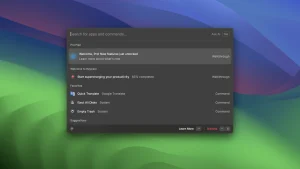
Raycast’s interface is known for its very clean and easy-to-use design. Simply press ⌥ + Space, and a floating interface opens, giving you access to everything you need to do in the app.
This app is designed with built-in shortcuts and commands that significantly speed up access to specific functions on your Mac and various tasks. If you want to run a custom command to define words, simply open the extensions menu, record a command for it, and you’re all set. This works for any action you want to automate with commands.
If the built-in features aren’t enough, you can add your own script commands, including access to over 400 scripts already created by the Raycast community.
Third-Party App Integration: You can connect Raycast to third-party apps and execute custom commands for actions in those apps. An example of this is the ability to connect your Google account to Raycast. From there, you can execute a custom command to create a new Google document or search your Google Drive library.
Another example is the ability to connect your Zoom account. If you’re a college professor or a remote team leader who regularly schedules meetings, this will likely come in handy. Once connected, you can set up Teams to schedule meetings, start meetings, and view upcoming meetings.
Other features: Let’s say you want to program a command to go to a specific web page. The Quick Links feature lets you do just that. You can even choose which browser or app you want the links to open in. You can search for local files using the command and run commands to view your calendar schedule.
Floating notes are also a great addition to Raycast. For those who quickly think of something and want to jot it down, the floating notes window is perfect for that. After writing a note, you can share it with your Apple Notes, send it to someone in iMessage, or copy it to the clipboard.
These are just a few of the many great features Raycast has to offer. We highly recommend checking it out if you’re looking for a program that makes creating useful shortcuts easy. Don’t forget to check out Raycast if you’re interested!
Release notes are available on the official website raycast.com
Raycast Pro 1.104.18 Mac
Raycast has become the most popular productivity launcher on Mac, and version 1.104.18, released on May 28, 2026, is the latest stable build before the team began rolling out the Raycast v2 beta. It is a maintenance release that continues to refine one of the fastest and most capable launchers available on macOS today.
What is Raycast?
Raycast is a blazingly fast, fully extendable launcher that replaces macOS Spotlight with something far more powerful. From one keyboard shortcut you can launch apps, search files, control Spotify or Apple Music, manage windows, access clipboard history, run snippets, open Quicklinks, use a calculator, check your calendar, and interact with AI all without touching the mouse. It also has a large extension store where developers have built integrations with tools like Figma, Notion, Linear, GitHub, Xcode, and hundreds more.
What the 1.104 Series Brought
The 1.104.0 release in December 2025 introduced Raycast Wrapped 2025 personalized annual stats covering your most launched apps, extension usage, meeting time, AI activity, Focus stats, and more. It also improved File Search Beta to match Windows parity and fixed a hotkey reliability issue with the lock screen command.
Since then, the 1.104.x patch series has delivered steady weekly improvements. Version 1.103 earlier in the cycle brought full macOS Tahoe readiness, including Liquid Glass controls in AI Chat and fixes for Focus mode terminating video conference apps incorrectly. Version 1.102 introduced Auto Transcribe with Granola for meeting notes, Auto Model selection that picks the best AI model for any given task, and Bring Your Own Models support for any OpenAI-compatible provider.
Raycast v2 Beta What’s Coming
The team has announced Raycast v2 as the next generation of the app, currently in beta. It requires at least version 1.104.16 to migrate from, and introduces a data import and migration flow from v1. Full details of v2 are still rolling out, but it signals a significant rebuild is underway.
Pricing
Raycast is free with a generous core feature set. Raycast Pro is $10 per month and adds AI Chat, cloud sync, custom themes, and more. Pro with Advanced AI is $20 per month. It requires macOS 13 or later and runs natively on both Intel and Apple Silicon Macs.



About Author
