Gitfox 4.3.2 for Mac
Gitfox 4.3.2 for Mac
Gitfox is a powerful, lightweight, and fully native Git client. It’s designed for developers who value a well-designed interface, high performance, and deep integration with Apple’s operating system. Gitfox helps simplify complex Git operations, making working with repositories intuitive and visually pleasing.
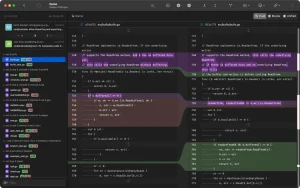
Features: • Excellent Diffs and Line Staging: Gitfox clearly highlights inline changes. Line Staging allows you to break down your work into small steps and commit only the lines you need, while Image Diffs let you compare image versions, which is essential for web and graphic designers.
• Interactive Rebase and Git Flow: Full support for rewriting history: you can modify, rename, delete, squash, or reorder commits. Fully integrated Git Flow lets you manage features, bugfixes, hotfixes, and releases in just a few clicks.
• Drag & Drop for Complex Commands: Forget about typing complex commands manually. Creating branches and tags, pushing, cherry-picking, merging, or rebasing – all this can be done simply by dragging and dropping interface elements.
• Manage multiple identities: Easily switch between different Git accounts to work on projects in different organizations, setting your own settings (name, email) for each repository.
• Advanced Search and Reflog: Powerful full-text search with smart result highlighting, as well as support for Reflog, a log of all repository operations. It can save you if you accidentally delete a branch or miss an important commit.
• Conflict resolution: Simplified conflict merger – you can select the required party (yours or the incoming one) with just one click.
Integration with services and tools:
• Accounts: Easy OAuth authorization for GitHub, Bitbucket, and GitLab.
• Merge tools: External mergetools (Kaleidoscope, Araxis, P4Merge, FileMerge) are supported, as well as any tools configured in your
Gitfox 4.3.2 A Native Git Client Built Exclusively for Mac
Gitfox is a lightweight, fast, and powerful Git client written exclusively for macOS. Version 4.3.2 is the latest release in the 4.x series, which has been one of the most actively updated lines in the app’s history with regular improvements throughout 2026.
What is Gitfox?
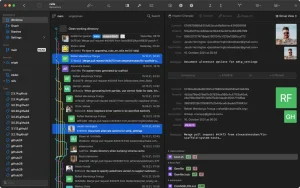
Gitfox gives developers a clean, visual way to manage Git repositories without relying on the command line. It shows a clear graph of branches, commits, and merges, lets you stage individual lines, resolve conflicts, rebase interactively, and manage multiple identities across projects all from one native Mac interface. It integrates with GitHub, GitLab, and Bitbucket via OAuth for seamless authentication and repository cloning.
Standout Features
A few things set Gitfox apart from other Git clients. Image Diff shows visual changes in image assets side by side, including size and dimension differences useful for teams that work with design files alongside code. Interactive Rebase lets you edit, reword, drop, squash, fixup, or reorder commits freely. Line Staging lets you commit only selected lines rather than entire files, keeping commits focused and clean. Git Flow is fully built in, covering features, bugfixes, hotfixes, and releases with one-click actions. Drag and Drop makes complex operations like cherry-pick, merge, and rebase as simple as dropping a branch onto another.
Recent 4.x Updates
The 4.1.4 update, released April 29, 2026, made the entire repository info title row clickable to open the repository manager, moved the Trash action to a pop-up menu, and fixed worktree path truncation so the end of long paths remains readable. The 4.1.5 build added Quick Look for files via CMD+Y, fixed automatic fetch being paused during log queries, resolved a thread pool exhaustion bug, and patched a memory leak. Version 4.3.2 continues this maintenance track with further refinements.
Pricing
Gitfox is available directly from gitfox.app and is also included in Setapp, which starts at $9.99 per month and covers hundreds of Mac apps under one subscription.



About Author
