Flacbox 7.4 for Mac
Flacbox 7.4 for Mac
Flacbox – High-resolution music player and streamer with equalizer and bass booster.
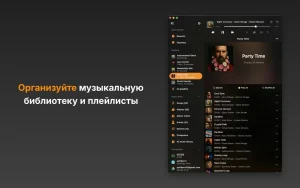
Open almost any audio file on your device and enjoy lossless sound quality. Free up space by moving your music to a personal NAS or cloud storage, then stream or download your favorite songs for offline playback. Automatically sync your music library, grouping all audio files by category. Create custom playlists, rearrange songs, and manage your music collection with the built-in file manager. The built-in audio equalizer includes presets for popular genres, manual adjustments, import and export presets, and a preamp for louder sound. Quickly find your favorite albums and songs with the smart search feature.
Main functions:
• Supported audio formats: AAC, AC3, AIFF, ALAC, DSF, FLAC, M4A, M4V, MKV, MOV, MP3, MP4, MPEG, OGG, OPUS, PCM, WAV, WMA and others.
• Supported cloud services: iCloud Drive, Google Drive, Dropbox, OneDrive, Box, MEGA, Cloud Mail.ru, InfiniCLOUD, Yandex.Disk, WD MyCloud Home, Put.io, MediaFire, MyDrive, pCloud, HiDrive, OpenDrive.
• Network protocols: WebDAV, SMB, DLNA.
• Playlist formats: M3U, M3U8, CUE.
• Audio equalizer: user presets, level meters, preamplifier.
• External streaming: AirPlay, AirPlay2.
• Transfer files via Wi-Fi.
• ID3 tag editor.
• Control playback speed.
• Pitch correction.
• Save/restore player queue and playback position.
• Audio channels: 1 to 7.
• Sampling frequency: from 8 kHz to 384 kHz.
• File manager.
• Sort options: song number, title, album, artist, album artist, genre, composer, rating, year, bpm, plays, bit rate, duration.
• Media library: grouped by songs, albums, album artists, performers, genres, composers.
• Audio playlists: creation, import, export.
• Recently played files.
• Favorites.
• Audio bookmarks.
• Sleep timer.
• Time of passage.
• Personalization.
• Comments.
• Widgets.
• Random play mode.
• Repeat modes: repeat all tracks, repeat one track, stop after finishing a track.
• Album covers.
• Offline and online music synchronization.
• Advanced search.
• Background mode.
Flacbox 7.4 Hi-Res Audio Player for Mac
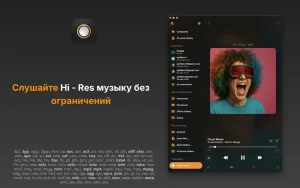
If you have a large music library in FLAC, DSD, or other lossless formats and want a proper player on Mac, Flacbox is one of the best options available. Version 7.4, updated on May 27, 2026, brings a significantly expanded set of streaming sources to the app.
What is Flacbox?
Flacbox is a hi-res music player for Mac, iPhone, and iPad from Everappz that plays FLAC, DSD, ALAC, WAV, and 120+ formats natively while streaming libraries from cloud storage, NAS shares, and self-hosted media servers. It is built for people who want to keep their music collection off Apple Music and play it in full quality without any re-encoding or compression. Shadowrocket
What’s New in 7.4
This update is all about connectivity. Version 7.4 adds Plex, Jellyfin, Emby, Subsonic, Navidrome, SFTP, and privacy clouds so one app can reach NAS, home-lab, and encrypted storage libraries. On top of that, Internxt, Proton Drive, QNAP, Nextcloud, Amazon S3, FTP, and NFS are also now supported as sources. CarPlay support has also been rebuilt in this release, making it easier to use your hi res library in the car. RapidSeedboxShadowrocket
Core Features
Flacbox indexes metadata, builds playlists, and plays gapless with a 10-band equalizer, lyrics, AirPlay, and Chromecast. Offline caching lets you download albums for flights or commutes without re-encoding lossless files. A built-in tag editor and M3U/CUE playlist support suit large personal libraries. It requires macOS 12.0 or later. App Store
Pricing
Flacbox is free to download with optional Premium available at $2.99 per month, $19.99 per year, or $69.99 as a lifetime purchase.



About Author
