Rectangle Pro v3.78 for Mac
Rectangle Pro v3.78 for Mac
Unlike window managers based on touch gestures, Rectangle Pro only consumes CPU resources when you press configured modifier keys.
Rectangle Pro is easy to learn and doesn’t conflict with any built-in macOS behavior.
Create application groups to organize your entire workspace with all your custom window sizes/positions with just one shortcut.
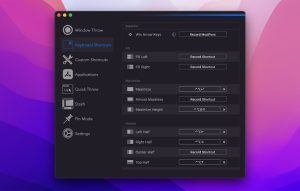
Create keyboard shortcuts for any window size and location, and specify what happens each time they’re repeated.
Fill in the left and right actions to make the most of the screen without overlapping.
Move and resize by holding down the key and dragging the cursor
Snap windows under your cursor, even if they’re not in focus.
Custom labels for any size and position
Sync settings via iCloud
Rectangle Pro v3.78 for Mac — The Ultimate Window Manager
If your Mac windows are all over the place, Rectangle Pro is the app that brings order to chaos. Built by indie developer Ryan Hanson, Rectangle Pro is the most feature-rich window management tool on macOS and version 3.78 is the latest and greatest build available right now.
What Makes Rectangle Pro Special?
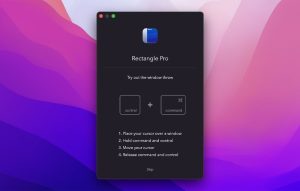
One Key Combo, 16 Window Positions Rectangle Pro’s signature feature is Window Throw a single keyboard shortcut that lets you toss any window to 16 different sizes and positions on screen, even if that window isn’t currently in focus. No memorizing dozens of shortcuts. One combo.Done.
Snap Areas & Snap Panel Create custom snap targets anywhere on your screen. A built-in, configurable Snap Panel lets you drag and drop windows into perfect positions instantly. For power users, this alone is worth the price.
Application Layouts Arrange your entire workspace every app in its exact spot with just one shortcut. Layouts can even activate automatically when you connect or disconnect a display.Perfect for switching between desk and laptop setups.
Window Stash Hide windows by sliding them off the edge of your screen. When you need them back, just move your cursor to the edge and they slide right out. Clutter gone, workflow intact.
Pin Mode Pick one app and pin it to a side of your screen similar to a Todo sidebar, but with far more configuration options. Great for keeping a reference window always visible.
iCloud Sync Your shortcuts and settings sync seamlessly across all your Macs via iCloud, so your workflow stays consistent whether you’re at your desk or on the go.
Key Highlights
- Over 61 customizable keyboard shortcuts
- Cursor gestures, trackpad gestures, and snap areas
- Fully customizable menu bar menu
- Quick Actions for lightning-fast window movement
- Battery-friendly — uses minimal resources
- One license works on up to 3 devices
macOS Compatibility
Rectangle Pro v3.78 requires macOS 11 (Big Sur) or later and supports both Apple Silicon and Intel Macs. A free 10-day trial is available, with a one-time purchase after that.
![NetWorker Pro v11.0.11 [MAS] for Mac](https://appmacs.com/wp-content/uploads/2026/06/NetWorker-Pro-v11.0.11-MAS-for-200x125.jpg)


About Author
