iStat Menus 7.30 for Mac
iStat Menus 7.30 for Mac
This is the most detailed Mac performance monitor available. iStat Menus is a feature-rich system data logger that lives in the menu bar and provides vital information about key indicators. You get statistics on CPU load, used and free disk space, disk activity, monitor temperature, fan sensors, battery life and cycles, weather, and much more. And what’s more, the app supports Dark Mode. Of course, it wouldn’t! Key features of iStat Menus
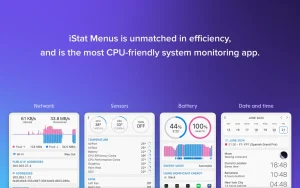
CPU & GPU Everything you need to know to ensure your computer is running smoothly is CPU load and overall activity. Quickly check these without opening an application—the menu bar icon provides the information you need. The information is provided in real time, so you can monitor each process individually or the overall load. Memory You can view your computer’s memory information in your preferred format—as a pie or line chart. You’ll also get a list of the applications using the most memory, so you know which ones to close when you’re running low. Network This is another system monitor that contains details about your current connections and a separate section with charts for the frequency ranges of individual networks and applications. Disk Usage & Activity Natural disk usage and overall disk activity are key performance indicators. In addition to general information about your hard drive and network drives, iStats provides a variety of read and write indicators, as well as SMART Sensors status monitoring . Get up-to-date statistics on everything related to your hard drive: temperature, power supplies, fans and their speed, current, and voltage. You can set rules to adjust fan speed when your Mac uses battery power to conserve battery life and extend battery life. Date & Time : Get the most essential daily information in super-detailed form: date, time, a comprehensive weather forecast with a temperature calendar, moon phases, wind speed, dew point, and much more. iStat also displays world clock, so you can see not only the time but also sunrise and sunset times anywhere in the world.
Release notes are available on the official website >
iStat Menus 7.30 for Mac Know Everything About Your Mac, At a Glance
Your Mac is a complex machine and iStat Menus by Bjango is the app that tells you exactly what’s happening inside it, right from your menu bar. Trusted by power users, developers, and system administrators worldwide, iStat Menus is the most comprehensive, efficient, and beautifully designed system monitor on macOS. Version 7.30, released on May 14, 2026, brings meaningful new features and important fixes that make it the best build yet.
What’s New in v7.30?
Super Core Support in CPU iStat Menus 7.30 adds support for super cores in CPU monitoring keeping it fully up to date with the latest Apple Silicon architectures that use efficiency, performance, and super core designs.
Network Interface Icons in Menu Bar A new interface icon menu bar mode for the network item lets you see exactly which network interface is active at a glance, right in your menu bar.
Cloud Cover in Weather Forecast Graphs Weather gets smarter you can now add cloud cover as an option to weather forecast graphs, giving you a richer, more complete picture of upcoming conditions.
Fan Control Improvements Fan control has been improved for M3 and M4 Macs, giving Apple Silicon users more precise thermal management than ever before.
Smarter CPU Core Grouping CPU core grouping in both the menu bar and dropdown menu has been improved for cleaner, more readable performance displays.
Bug Fixes
- Fixed S.M.A.R.T. sensors not being retained in the menu bar
- Fixed purgeable space setting in disks not working correctly
- Fixed time zone and calendar event issues in the Time menu
- Fixed a Bluetooth device appearing twice
Why iStat Menus Is Irreplaceable
Monitor Everything from the Menu Bar iStat Menus covers every critical system stat in one lightweight, highly optimized package:
- CPU & GPU usage, per-core activity, FPS, frequency monitoring
- Memory RAM usage, page ins/outs, swap info
- Disks read/write speeds, storage usage, S.M.A.R.T. status
- Network upload/download speeds, per-app bandwidth, IP addresses
- Sensors temperatures, fans, voltages, power draw
- Battery charge state, health, Magic Mouse/Keyboard levels
- Weather 7-day forecasts, hourly details, cloud cover, notifications
- Date & Time fuzzy clock, moon phase, world clocks, calendar events
Powerful Smart Alerts Get notified about virtually anything — CPU spiking above a threshold, battery running low, temperature getting too hot, internet going down, IP address changing, or even daylight saving reminders.
Combined Mode Combine all your stats into a single menu bar item to save precious menu bar space especially handy on MacBooks with notches. Click it to see everything at once.
30-Day History Graphs Drill into history graphs covering up to 30 days of data for any stat invaluable for diagnosing intermittent performance issues.
Zero Ads, Zero Tracking iStat Menus is completely privacy-first no ads, no analytics, no data collection of any kind. Your system stats stay on your Mac, always.
Pricing & Compatibility
- Price: $11.99 one-time purchase from bjango.com or the Mac App Store
- Also included in Setapp subscription
- Requires macOS 11.0 or later
- Supports both Apple Silicon and Intel Macs Universal Binary



About Author
