Video Converter X2 1.3.6 for Mac
Video Converter X2 1.3.6 for Mac
Video Converter X2 is a multi-functional file conversion software that supports converting almost all multimedia formats, including video (MP4, AVI, 3GP, WMV, MKV, VOB, MOV, FLV) and audio (MP3, AC3, FLAC, AAC, M4A, AIFF, WAV, etc.).
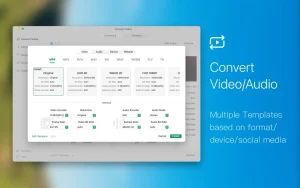
Video Converter X2 has built-in format templates optimized for various devices, including Mac, iPhone, iPod, Android, Windows, TVs, and more. You don’t need to worry about which formats are compatible with which devices – simply select the desired device type from the template list in Video Converter X2 and start converting easily.
Features: – Support for almost all multimedia formats and their easy conversion to the format you need.
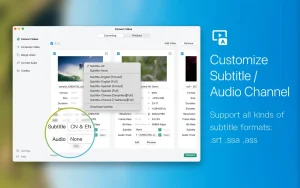
– Possibility to select built-in subtitles or load external files (SRT, SSA).
-Support multiple audio tracks to choose from.
-Compressing video files helps reduce their size, saving space on your hard drive.
– Built-in format templates for Mac, iPhone, iPod, Android, Windows devices, TVs, and more.
– Support for popular website and app formats, including optimized templates for WeChat, Bilibili, Facebook, Instagram, and YouTube – conversion is done in one click.
– Quick video merging: Supports merging multiple video files. Even if the source formats are different, they can be perfectly combined into a single new file.
Video Converter X2 1.3.6 for Mac Convert Any Video, Any Format, Instantly
Video files come in every format imaginable and not all of them play nicely with every device or platform. Video Converter X2 is the clean, fast, and powerful Mac App Store converter that takes the confusion out of video formats entirely. Version 1.3.6 is the latest release, and it handles virtually every multimedia format you can throw at it quickly, easily, and beautifully.
What Is Video Converter X2?
Video Converter X2 is a full-featured multimedia format converter designed exclusively for macOS. Whether you need to convert a video for your iPhone, prepare a clip for YouTube, or extract audio from a movie file Video Converter X2 does it all in just a few clicks, with no technical knowledge required.
Key Features
Supports Almost Every Format Video Converter X2 handles an impressive range of multimedia formats both video and audio:
- Video: MP4, AVI, MKV, MOV, WMV, FLV, 3GP, VOB, and more
- Audio: MP3, AAC, FLAC, AC3, M4A, AIFF, WAV, and more
No matter what format your file is in, Video Converter X2 can convert it to exactly what you need.
Device-Optimized Templates Stop guessing about which format works on which device. Video Converter X2 includes built-in format templates optimized for Mac, iPhone, iPod, Android, Windows, TV, and more. Pick your device, hit convert done.
Social Media Ready Built-in templates for YouTube, Instagram, Facebook, WeChat, and Bilibili mean your videos are always perfectly formatted for any platform one click, ready to upload.
Batch Conversion Convert multiple videos at once saving time and effort on large collections. Add your files, set your format, and let Video Converter X2 handle the rest.
Audio Extraction Need just the audio from a video? Video Converter X2 lets you extract audio tracks from any video file and save them as MP3, AAC, FLAC, or any other audio format you need.
Subtitle Support Choose built-in subtitles or load external subtitle files in SRT or SSA format and pick from multiple audio tracks when working with multi-language video files.
Video Compression Reduce your video file size with the built-in Video File Compression tool keep your storage clean without sacrificing quality.
Video Merging Merge multiple video files into one seamless clip fast and effortlessly, directly inside the app.
Pricing & Compatibility
- Available on the Mac App Store free to download with Full Version included as an in-app purchase
- Requires macOS 10.15 Catalina or later
- Supports both Apple Silicon and Intel Macs



About Author
