WG DAW Converter 3.2.19 for Mac
WG DAW Converter 3.2.19 for Mac
WG DAW Converter is a convenient utility for quickly transferring sessions and projects between different workstations without having to launch the original program.
The application directly reads project files and converts them to the format you need, fully preserving track placement, titles, markers, and tempo maps.
The third version added the ability to export to Pro Tools, the ability to drag and drop finished files directly into the workstation window, and support for opening old Cubase VST and Nuendo projects dating back to 1999.
▎Version 1.1.0
• Improved compatibility with current versions of supported digital audio workstations (DAWs).
• Improved stability of converting projects between different DAWs.
• Fixed detected errors when importing and exporting projects.
• Internal performance and memory usage optimizations have been performed.
• Improved compatibility with Apple Silicon and Intel computers running macOS.
• The developer has not published a detailed official list of changes for version 3.2.19.
WG DAW Converter 3.2.19 for Mac: A Quick Look
WG DAW Converter solves a headache familiar to anyone who works across studios or collaborators: moving a session from one digital audio workstation to another without owning or even opening the source application. Version 3.2.19 is the current Mac build in its v3 line.
What It Actually Does
The app reads session files directly from Pro Tools (.ptx/.ptf/.pts), Studio One, Ableton, Cubase, Nuendo, FL Studio, REAPER, Logic Pro, Audition, and OMF/AAF interchange files and converts them into whatever format the destination DAW needs: AAF, OMF, Ableton .als, REAPER .rpp, Audition .sesx, DAWproject, or aligned per-track WAVs. Track names, clip positions, markers, and tempo maps are meant to carry over intact, so producers and engineers don’t have to manually rebuild a session from scratch when switching platforms.
Two Ways to Work
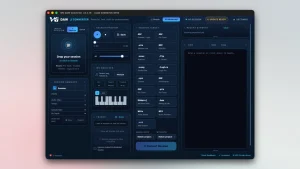
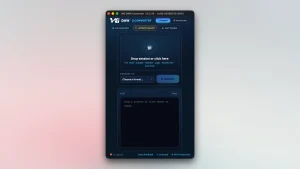
A Simple view keeps things to drag, convert, done, while an Advanced view exposes per-track controls, sample-rate and bit-depth overrides, export target selection, a recent-jobs list, and a live conversion log for anyone who needs finer control.
What’s New in Version 3
The jump to v3 added a few notable capabilities: export directly to Pro Tools via AAF, the ability to drag a finished export straight into a DAW on Windows, and support for rescuing vintage Cubase VST and Nuendo 1.x projects dating back to roughly 1999 useful for studios sitting on old archives.
The 3.2.19 Build Specifically
As with many point releases in this line, WGProductions hasn’t published a dedicated public changelog for build 3.2.19 it’s best understood as a maintenance update within the v3 series, with release notes available through the app’s own updater after installation. Users on forums like Gearspace have noted incremental fixes across recent 3.2.x builds, including improved handling of crossfades and markers when converting between formats like Pro Tools and Logic.
Good to Know
The Mac build requires macOS 11 or later, runs as a universal Intel/Apple Silicon binary, and ships signed and notarized. It’s sold directly through WGProductions rather than the Mac App Store, as a one-time purchase (introductory $49, regular $99) that includes five free trial conversions, offline activation, use on three computers, and free lifetime updates. Fidelity varies by source/target pair automation beyond simple volume moves, and plugin/bus routing, may not round-trip perfectly, so critical sessions are worth verifying in the destination DAW before relying on them fully.
Dropzone 5 5.0.9 for Mac

Pixea Plus 8.1.0 for Mac

Parallels Desktop 27.0.0-58597 (Beta) ARM only for Mac
About Author
