ColorSlurp 4.0.1 for Mac
ColorSlurp 4.0.1 for Mac
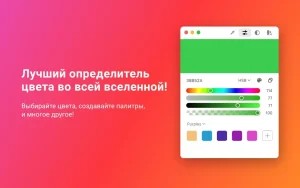
ColorSlurp is the perfect color tool for developers and designers.
Peculiarities:
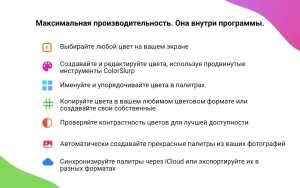
• Select colors on your screen with the ultra-precise magnifier.
• Create and edit colors using a variety of color selection tools.
• Copy colors in different formats and create your own.
• Name and organize colors into palettes, then sync them between Mac and iOS via iCloud.
• Automatically create palettes from your photos.
• Check color availability with the contrast tester.
• Create beautiful color harmonies based on your edited color.
• Work faster with customizable hotkeys.
• Import and export colors in different files and for different languages.
• Quickly open your recently selected colors.
• Use your iPhone camera to pick the colors of any object in the world.
• Looks amazing in dark mode and supports TouchBar.
• Atmospheric suction sound when choosing a color!
# Magnifying glass
Select any color on the screen using the magnifying glass. Move the magnifying glass with the cursor or the keyboard arrows, or long-press for slow motion with pixel-perfect precision. Then copy the color in any format with a single click. Select multiple colors at once and create a palette.
# Edit colors
Create perfect colors with powerful editing tools. Use various sliders to adjust colors. Quickly select a specific color from the swatch panel, browse recently selected colors, or find color harmonies based on the color you’re editing.
# Palettes
Name and organize colors into palettes. Drag and drop an image from anywhere into the ColorSlurp window to automatically generate a palette. Sync palettes across all your Mac computers and iOS devices via iCloud, and export them to Plain Text, CSS, ASE, CLR, Sass, Swift, HTML, JSON, PDF, PNG, Xcode, JSON, and more!
# Contrast tester
Instantly check the contrast between two colors using WCAG 2.0 guidelines. Creating accessible designs has never been easier!
# Color formats
Copy color to HEX or any other language you need. You can even create your own formats!
# Copy and paste!
Paste a color into ColorSlurp directly from the clipboard to edit it. ColorSlurp recognizes all built-in formats, including your custom ones. After editing, use hotkeys to copy the color to your favorite format or drag and drop colors directly into your favorite apps.
# Get these features with ColorSlurp PRO!
• Synchronization via iCloud
• Contrast tester
• Color formats
• Patterns and color harmonies
• Recent colors
• Export palettes
• Palette generator
• Unlimited palettes
ColorSlurp 4.0.1 for Mac: A Quick Look
ColorSlurp has long been a favorite among Mac designers and developers who need a fast, reliable way to grab colors from anywhere on screen. With version 4.0.1, the app builds on last release’s major redesign with a round of practical refinements.
What ColorSlurp Does
At its core, ColorSlurp is a screen color picker: open its magnifier, move it with the cursor or arrow keys, and copy the color under your pointer in whatever format your workflow needs hex, RGB, HSL, and newer spaces like OKLCH, LAB, and Display P3. A precision mode slows the magnifier down for pixel-perfect selection, which is especially useful on Retina and wide-gamut displays.
The ColorSlurp 4 Redesign
Version 4 reorganized the app around Projects, letting users group palettes by client, brand, or theme instead of dumping everything into one long list. It also introduced a dedicated Tools tab with a contrast checker (supporting both WCAG and APCA methods), a color wheel, and a random color generator. Dragging any color to the bottom of the window instantly spins up a new palette, and a palette browser lets users explore curated presets. iCloud sync keeps everything aligned across Mac and iOS, where the app also supports camera-based color picking.
What’s New in 4.0.1
Building on that redesign, version 4.0.1 <cite index=”25-1″>adds automatic palette backups, expanded localization, and reliability fixes</cite>. In practice, this means less risk of losing carefully built palettes, better support for non-English users, and a more stable experience overall the kind of polish that typically follows a big structural update like ColorSlurp 4.


About Author
