4K Video Downloader Plus Pro 26.2.1 for Mac
4K Video Downloader Plus Pro 26.2.1 for Mac
4K Video Downloader is a simple video downloader, nothing more. Video hosting services have made watching videos convenient and widely available, but they also have obvious drawbacks. A video might be online one minute, but it might be deleted an hour later. Your friend in Europe might watch a recording that’s unavailable in Russia. You might have internet access today, but tomorrow you’re planning a trip to the middle of nowhere without even the slightest hint of 3G. In short, being able to save important videos locally is useful, and to simplify the process, it’s wise to use a specialized utility.
4K Video Downloader lets you download high-quality YouTube videos, audio, and subtitles to your computer. If you want to download videos to your iPad, iPhone, and other devices, this app is for you. Downloading is simple and easy: just copy the link from your browser and click “Paste URL.” Enjoy the video anywhere, anytime, even offline.
* A registered program allows you to download YouTube channels and playlists with subtitles or containing more than 25 clips
Functions:
• Download entire playlists and channels from YouTube and save them in MP4, MKV, M4A, MP3, FLV, 3G, create .m3u files for playlists.
• Download videos in HD 1080p, HD 720p or 4K quality and enjoy high definition on your HD TV, iPad and other devices.
• Advanced options for downloading subtitles, choose what you prefer: have a separate .srt file or embed subtitles in a video file for viewing on your Mac, for example.
• Activate “Smart Mode” to apply your selected settings to all downloads, quickly and easily.
• Download videos in 3D format; you’ll find a small 3D icon among other formats after parsing the link. It’s truly impressive to watch shows and cartoons in 3D.
• Download embedded YouTube videos from any web page, just copy and paste the page address, the program will automatically find the download source.
• Download videos and audio from popular sites like Vimeo, SoundCloud, Flickr, Facebook and DailyMotion.
How to download videos from popular video hosting sites on Mac: 4K Video Downloader:
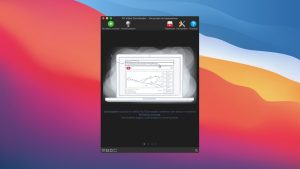
As its name suggests, Video Downloader works with videos of any quality, up to 4K. To get the desired video on your Mac, simply have the video or playlist link in your clipboard, then open 4K Video Downloader and click Paste URL.
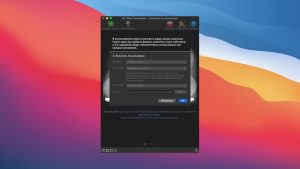
The program will immediately “swallow” the link, after which it will prompt you to specify the parameters for the downloaded videos.
• extract the entire video, or just the sound;
• the format in which you want to save the video (3D videos are also supported and saved correctly);
• the quality of the original video that will be downloaded from the video hosting site;
• whether to include subtitles in the video, and if so, in what language and in what format (as a separate file or embedded).
After this, all you have to do is specify the save path and click the Download button.
If you’re downloading dozens of videos from different sources and don’t need to individually adjust the quality for each one, consider using a clever “smiley” feature called Smart Mode. It’s essentially a template with parameters for downloaded videos. In this mode, simply paste the link to the video you want to download into the app, and 4K Downloader will handle everything else automatically, including the save path, according to the preset options. Basically, it’s a one-click download.
4K Video Downloader supports YouTube, Vimeo, Facebook, DailyMotion, SoundCloud, Flickr and Instagram.
As mentioned above, accessing a video requires only a link to it. This allows you to download videos, including those unavailable in your region. Even if a YouTube video is embedded on a webpage with enhanced privacy settings (meaning no option to view it on YouTube itself), 4K Video Downloader somehow recognizes the video in the link to the page and successfully retrieves it.
4K Video Downloader Plus Pro 26.2.1 for Mac: What’s New
4K Video Downloader Plus, developed by Open Media, has released version 26.2.1 for macOS. The app lets users download videos, audio, subtitles, playlists, and channels from platforms like YouTube, Vimeo, Facebook, and TikTok, and remains a popular alternative for anyone who wants offline access to online video content.
About This Release
Version 26.2.1 is a smaller, incremental update following closely on the heels of 26.2.0. <cite index=”17-1″>Compatibility requirements vary slightly depending on the distribution channel, so it’s worth checking which build you’re installing, and the app is generally listed as requiring macOS 10.13 or later.</cite> As is common with minor point releases, formal release notes for this exact build weren’t widely published at launch, but it builds on the substantial changes introduced in the 26.2.0 and 26.1.0 updates just before it.
What Led Up to It: 26.2.0 and 26.1.0
The 26.2.0 release focused heavily on keeping pace with YouTube’s frequent platform changes. <cite index=”16-1″>It introduced a new YouTube bypass method aimed at defeating “403: Forbidden” errors and restoring access to login-protected links and formats, alongside fixes for parsing issues tied to consent-page redirects and link-type detection.</cite> That update also <cite index=”16-1″>shipped a new built-in browser component that improved site compatibility and login reliability across services like Google, Twitch, Vimeo, Facebook, and TikTok, while fixing blank-page issues on Apple Silicon Macs.</cite> Notably, <cite index=”16-1″>the new core libraries in this release raised the minimum supported operating systems to Windows 10 64-bit and macOS 12.</cite>
The prior 26.1.0 release focused more on stability and control. <cite index=”13-1″>It strengthened the underlying parsing and downloading engine to keep downloads working as platforms evolve, improved resilience to YouTube consent-policy changes, and increased reliability with certain hosting services.</cite> That version also <cite index=”13-1″>fixed a macOS-specific bug where settings would reset and licenses would be lost after updating, along with a rare crash when closing the parsing window.</cite>
Why These Updates Matter
Video platforms like YouTube regularly change their backend systems to prevent third-party downloading, which means tools like 4K Video Downloader Plus need frequent updates just to keep working. The steady cadence of releases 26.1.0, 26.2.0, and now 26.2.1 reflects that ongoing cat-and-mouse dynamic rather than a stream of flashy new features. For most users, the practical takeaway is simple: keeping the app updated is the best way to avoid broken downloads and login errors.



About Author
