Capture One Pro v16.7.8.16 for Mac
Capture One Pro v16.7.8.16 for Mac
Designed with the world’s most discerning photographers in mind, Capture One is the professional choice for imaging software, supporting over 500 cameras from Canon, Nikon, Sony, Fujifilm, Phase One, and many more.
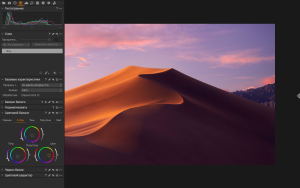
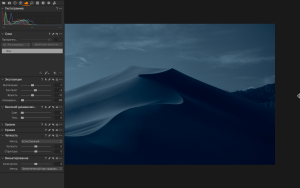
Capture One Pro is one of the most powerful professional RAW digital photo converters, supporting a wide range of modern cameras. It allows you to convert files on the fly to full-size TIFF (RGB/CMYK) and JPG formats in single and batch modes, adjust white balance, effectively process overexposed and underexposed images, fine-tune sharpness, and remove color noise.
Capture One allows you to apply multiple adjustments to the same image. The original RAW file is used as a template, not the result of previous adjustments. The workspace is divided into several areas, the number of which is equal to the number of adjustments on the original digital negative. White balance is adjusted using the color temperature and tint controls. You can also select scene modes, which are common in many cameras. You can also use the eyedropper tool. A neutral gray point is indicated on the photo, from which the white balance is adjusted.
Capture One Pro v16.7.8.16 for Mac The Gold Standard of RAW Editing
Professional photographers don’t settle and neither does Capture One Pro. Developed by Phase One, this is the RAW editor that studios, fashion photographers, and serious creators trust when image quality is everything. Version 16.7.8.16 is the latest and most refined build — and it’s loaded with smart new tools that take an already exceptional app even further.
What’s New?
Combine Masks Merge multiple masks manual, AI-generated, or luminosity-based into one unified mask. Complex selections are now faster and more flexible than ever.
Retouch Teeth & Eyes Two brand-new AI-powered tools let you enhance portraits naturally using simple sliders. Sharp eyes, bright smiles no Photoshop needed.
Clothes Masking Capture One’s AI can now intelligently isolate clothing within a frame. Perfect for fashion and editorial photographers who need precise control over fabric tones and colors.
Include Neck Area Skin retouching now extends seamlessly from face to neck no more uneven tones or sharp transitions in portrait work.
HSL Readouts Hover over any pixel and instantly see its Hue, Saturation, and Luminosity values in real time. Precise, data-driven color grading at your fingertips.
Contact Sheets (Beta) Generate traditional contact sheets directly inside Capture One no third-party tools required for proofing and client reviews.
PSB (Large Document) Support Full support for Adobe’s PSB format, making Capture One an even stronger partner in Photoshop-heavy workflows.
New Camera Support
- FUJIFILM X-T30 III full tethering
- Leica M EV1 wired tethering & Live View
- Canon EOS C50 wired & wireless tethering
- iPhone 16 & 17 tethering via Capture One mobile app
- All Canon RF mount lenses new Manufacturer Lens Profiles
Bug Fixes
- Fixed Light Falloff being applied twice
- Fixed pink tint on Nikon Z5 II DNG exports
- Fixed unexpected artifacts on Leica M10R files
- Fixed Live View camera screen freeze
macOS Compatibility
Fully compatible with macOS 14 through macOS 26, supporting both Apple Silicon and Intel Macs.

About Author
