Widgetter System Stats Widgets 2.4.1 for Mac
Widgetter System Stats Widgets 2.4.1 for Mac
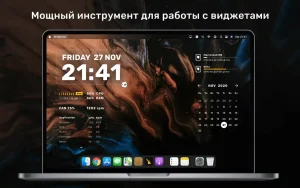
Widgetter is your best assistant in organizing your desktop space!
Intuitive widget interaction, stylish design, and a large collection of various widgets allow you to customize your space.
The app features a collection of wallpapers and widgets, organized into themes with various design variations. You can also choose and install 4K and 5K wallpapers from the collection.
Customize the widget’s size in a free format, so it’s as convenient as possible for you!
FULL CUSTOMIZATION: Customize colors and fonts just the way you like them.
Current set of widgets from Widgetter:
Date and time
stylish dial in various variations and design solutions to choose from;
Calendar
a visual monthly calendar always in front of your eyes;
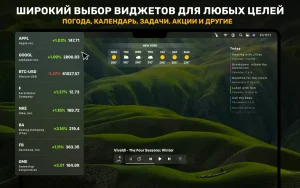
Weather
all the most important weather conditions for the current day and the coming week;
Battery
Monitor the charge level and condition of your battery;
Player
Create the right atmosphere in a couple of clicks – choose the best tracks in the playlist window;
Internet speed and volume of downloaded files
Monitor your current internet connection speed;
Currency and cryptocurrency quotes
Monitor changes in exchange rates and the situation on the stock exchanges;
Tasks and reminders
all your current and upcoming tasks are at your fingertips – you won’t miss anything important;
CPU
Monitor your CPU load in real time for smooth operation;
RAM
Find out which applications are using the most memory and whether there is any free space left;
HDD and SSD drives
Make sure your disk space is not full.
RPM
Monitor the efficiency of your cooling system to avoid overheating;
The widget collection covers a range of system data (logs, reports, and operations) that you can conveniently and easily manage directly from your desktop. No technical knowledge is required, as our widgets will highlight and notify you of potential errors and problems.
Add multiple widgets of the same type to track weather and time data in different cities and create selections of relevant promotions.
As a finishing touch, design your desktop to your liking by choosing a theme from the collection.
Widgetter System Stats Widgets 2.4.1 for Mac
Widgetter turns your Mac desktop into a customizable dashboard, letting you pin resizable, floating widgets right onto your wallpaper. It’s built by Villow (Bitnite LLP) for users who want at-a-glance system info without living in the menu bar.
Key Features
- System Stats CPU load, fan RPM, RAM usage (with heavy apps listed), disk space, battery level, and network throughput
- Everyday Widgets clock, mini calendar, weather, currency/crypto quotes, Reminders, and a simple music player
- Full Customization freely resize widgets, tweak fonts and colors, and group layouts however you like
- Always-on-Top Mode keep critical widgets visible above every other window
- Multiple Instances add several widgets of the same type, e.g., weather or stocks for different cities/tickers
- 4K/5K Wallpapers & Themes bundled high-resolution backgrounds paired with matching widget skins
What’s New in 2.4.1
Released June 19, 2026, this is a maintenance update the App Store’s “What’s New” notes list only minor bug fixes and stability refinements, with no new widget types added. The core widget/theme lineup was introduced back in version 2.4.
Compatibility
Works on macOS Ventura or later, fully optimized for Apple Silicon (M1/M2/M3). The install is around 280 MB, mostly due to bundled wallpaper and theme assets.
Pricing
Widgetter is free to download, with in-app purchases available to remove watermarks and unlock Pro features via subscription or one-time payment.

Capture One Pro v16.7.8.16 for Mac

Moomintroll Winter Warmth 0.1.128 for Mac

Money Pro 2.11.30 for Mac
About Author
