Marked 3.0.39 for Mac
Marked 3.0.39 for Mac
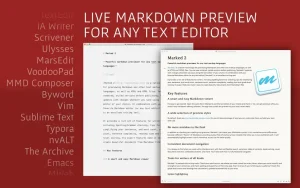
Marked 2 is a previewer (not an editor) for Markdown, MultiMarkdown, and other text markup languages. It updates in real time every time you save a document in your favorite text editor, features tools for analyzing your writing, and offers tremendous flexibility.
Marked provides document navigation and statistics, proofreading tools, multiple export formats, and much more. Marked comes with nine built-in preview styles (including GitHub), and you can add an unlimited number of your own.
For writers, there is MultiMarkdown processing with tables, footnotes, file transfers, and other MultiMarkdown-specific features.
GitHub users will appreciate Marked’s built-in GitHub Flavored Markdown processor, which can handle enclosed code blocks, preserve line breaks, and automatically create hyperlinks.
Marked is powerful enough to allow custom processors (shell scripts) to be used before and/or instead of the built-in processors, allowing Markdown processing and the use of non-Markdown text processors.
Marked works with Scrivener, Ulysses, MarsEdit, Highland 2, iThoughtsX, MindNode, and other third-party apps, letting you use Markdown and see beautiful previews almost anywhere.
Translated using DeepL.com (free version)
Marked 3.0.39 for Mac: Refining a Writer’s Best Friend
For Markdown writers on the Mac, Marked has been a fixture for years, and version 3, built by developer Brett Terpstra, represents the app’s biggest overhaul since its debut. The newest update, 3.0.39, continues to polish that foundation with keyboard-driven convenience and stronger export reliability.
What Marked Does
Marked is not a text editor it is a live preview application. The idea is simple: keep writing in whatever editor you already love, whether that’s VS Code, iA Writer, Scrivener, Ulysses, or even Vim, and let Marked watch the file and render a beautifully styled preview every time you save. This editor-agnostic approach means writers don’t have to give up their existing workflow just to see polished, formatted output.
Beyond previewing, Marked is packed with tools aimed at writers and publishers. It includes spelling and grammar checking, readability scoring (Flesch-Kincaid and Fog Index), word and sentence counts, and a live table of contents for navigating long documents. It supports a wide range of Markdown flavors including GitHub Flavored Markdown, Kramdown, and MultiMarkdown along with custom shell-based processors and Custom Rules for transforming text before rendering. Export options cover PDF, HTML, DOCX, EPUB, RTF, TextBundle, and ODT, making it a useful bridge between plain-text drafting and polished, shareable documents.
What’s New in 3.0.39
Released in June 2026, version 3.0.39 brings a mix of new conveniences and under-the-hood fixes:
- A new Quick Actions palette: pressing a single key opens a searchable, Spotlight-style panel that runs menu bar and preview commands with fuzzy matching, letting frequent users stay on the keyboard instead of digging through menus.
- Stronger DOCX export: Mermaid diagrams are now embedded in exported DOCX files as rendered PNG images rather than raw source code or placeholder text.
- New AppleScript export commands covering Markdown, HTML, paginated and continuous PDF, EPUB, DOCX, ODT, TextBundle, RTF, and OPML, along with AppleScript properties for processors, preview styles, and document settings useful for automation-heavy workflows.
- Reliability improvements to PDF pagination, including better handling of heading page breaks and more consistent refreshing when page size, orientation, or margins change.
- Several fixes to Conductor (Marked’s automation and processing engine) and the Quick Actions palette for more consistent behavior.
Pricing and Availability
Marked 3 is available directly from markedapp.com, through the Mac App Store, and via the Setapp subscription bundle. The developer moved to subscription or permanent-unlock pricing for version 3 to support ongoing development, a shift from the one-time purchase model of earlier versions. The Mac App Store build requires macOS 12.4 or later.
Final Take
Marked has always stood out for respecting a writer’s existing toolchain rather than trying to replace it, and version 3 deepened that with a complete rewrite of DOCX export, new style tools, and broader format support. The 3.0.39 update doesn’t change that core experience, but the Quick Actions palette and the AppleScript automation hooks make it noticeably faster to use for anyone who relies on Marked daily, while the export and pagination fixes quietly smooth out rough edges for long-form and technical documents.


About Author
