QLab Pro 5.6 for Mac
QLab Pro 5.6 for Mac
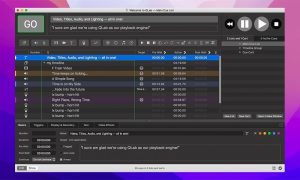
QLab makes it easy to create multifunctional multimedia projects for live performances and installations. From Broadway to the West End, in churches, museums, storefronts, concert halls, and theaters around the world, people use QLab to bring audio and video to life. QLab lets you design and manage incredible multimedia performances from your Mac OS X computer. From a single workspace, you can control audio, video, MIDI, OSC, and much more.
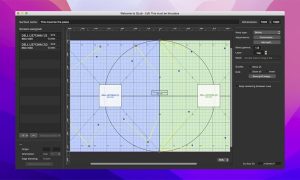
Need to trim the beginning and end of an audio track? It’s easy to do with the built-in editor. Want to flip and center a video on one of the projectors? QLab can help. If you don’t like the result, you can undo it and try again. QLab comes with support for 48 output and 24 input audio channels, intuitive audio signal editing, adjustable playback speed with pitch adjustment, video and audio faders, animation tools, audio and video effects, Syphon integration, keystone correction, and angle spinning. You can also add titles and use live video input from various devices, including Blackmagic devices
QLab Pro 5.6 for Mac Quick Overview
QLab is a cue-based show control app for Mac, used to create rich multimedia designs for live performances and installations from Broadway to the West End, in churches, museums, store fronts, concert halls, and theaters around the world.
What’s New in 5.6
This version adds visible audio metering in patch and level editors, making gain staging and routing easier to monitor during setup.
Core Features
- Handles multi-channel audio routing, video stages with masking and warping, and DMX lighting with instrument libraries
- Unlimited Cue Lists with unlimited cues, plus Cue Carts with 1 to 64 buttons per cart
- Non-destructive design tools that never modify your media files, with full undo support
- “Audition” cues locally without sending audio, video, or lighting output to the stage
- A “Record cue sequence” tool to capture timing and play it back the same way later
- Networked collaboration on one workspace and remote operation, letting designers and operators split roles during tech and performance
- Extensive AppleScript and OSC APIs, plus powerful remote editing via QLab Remote
Pro Licensing
Paid Audio, Video, and Lighting licenses unlock professional limits more channels, effects, NDI/Syphon, unlimited DMX addresses, and advanced fade tools; a free tier and timed demo mode let you test real show files before committing to a paid license.
Requirements
Requires macOS 11 (Big Sur) or later on Intel and Apple Silicon.



About Author
