SideNotes 1.6.2 for Mac
SideNotes 1.6.2 for Mac
SideNotes is a sidebar that fills one side of your Mac screen with notes. Whether text, code, or images, SideNotes can handle it all, keeping important information within easy reach. For convenience, organize notes into customizable folders, assign colors, and add flags to tasks. It’s a single place for everything that’s truly important.
SideNotes Key Features
Notes that don’t distract you
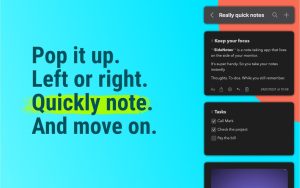
A blog post, a code snippet, or recently uploaded images—all of these can be stored on your desktop thanks to SideNotes. The best part is, you won’t even notice they’re there! The app acts like an overlay menu, drawing your attention to your notes only when you need them.
Dynamic display options
Remember, the app won’t distract you. That’s why you’ll need to choose when and on which side of the screen it appears. Open Preferences and choose one of two desktop locations—Left or Right. You can also choose to hide or show SideNotes using keyboard shortcuts or clicks.
Code-aware interface
SideNotes supports monospaced code. Each character has the same width, so you don’t have to switch fonts. Copy a code snippet and paste it into the SideNotes window as you work. To better organize your code notes, you can use a specific color.
Markdown formatting support
When creating a new note, you can choose the desired mode—code, plain text, or standard (markdown). The latter opens a variety of formatting options, such as adding headings or converting text to blockquotes. Everything you paste is formatted and formatted appropriately by default.
Your to-do list is done.
With SideNotes at your fingertips, you can accomplish more than ever before. And here’s the next essential feature: creating and managing to-do lists within your notes. By clicking the text formatting button, you can add checkboxes to your to-do list.
Share your notes
SideNotes keeps your notes private unless you choose to share them with the world. The app supports various sharing options, including Messages, Reminders, Notes, and Dropshare. And you can always add more. Just tap the “Share” button in the upper left corner of your note.
SideNotes 1.6.2 for Mac Quick Overview
SideNotes is a native macOS app that slides in from the screen edge, letting you capture notes, tasks, links, and code snippets without leaving your current window. It can be opened from the Open Bar, Hot Side cursor trigger, menu bar icon, or a keyboard shortcut, and it stays on top even in full-screen apps and Stage Manager.
What’s New in 1.6.2
This is a maintenance-focused update that polishes the editing experience:
- Detects pasted code and automatically inserts it as a code block
- Automatically moves completed tasks to the bottom of the list
- Lets you move lines up and down with a keyboard shortcut
- Improves drag-and-drop visual feedback
- Fixes a bug with selecting the last line via double-click, plus folder label readability issues
Core Features
- Mark notes with colors and group them into folders
- Drag and drop pictures directly from your browser
- Save links, code snippets, or colors; create task lists with three formatting modes Markdown, Plain Text, or Code
Requirements & Pricing
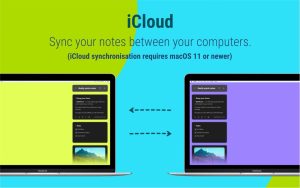
Requires macOS 13 or later, runs on both Intel and Apple Silicon Macs. Priced at $19.99, with a 30-day trial as a one-time purchase; the mobile version is sold separately. Notes are stored on-device and via private iCloud, with no app telemetry.



About Author
