MouseBoost Pro 5.1.0 for Mac
MouseBoost Pro 5.1.0 for Mac
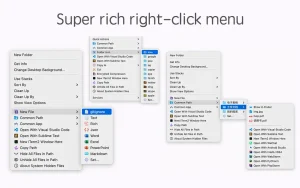
MouseBoost Pro integrates more than 30 kinds of small tools, and the operation method is very simple. By right-clicking the mouse, you can activate all kinds of functions you want, so that your work efficiency is greatly improved.
You can create any type of file, open any application, and everything is fully customizable.
Key Features:- All menus support custom sorting.- Quickly create all kinds of frequently used files, and also supports custom creation of different types of files you want.- Quickly open iTerm2 terminal and go to the directory you want.- Quickly open VSCode, Sublime Text and Emacs, and customize different applications you want to open.- Quickly copy the current path.- Supports complete file deletion.- Supports moving, copying and cutting files.- Supports file compression in encrypted form.- Quickly open your favorite directory.- Quickly get MD5, SHA1, SHA256 and other file information.- Supports hiding and showing specified files.- Supports changing the folder icon.
MouseBoost Pro 5.1.0 for Mac 30+ Tools in a Single Right-Click
Most Mac users never think twice about the right-click menu. MouseBoost Pro turns it into a full productivity powerhouse.
MouseBoost Pro integrates more than 30 kinds of small tools, and the operation is very simple just click the right mouse button to activate all kinds of functions you want, greatly improving your work efficiency.
Key Features
File Creation & Management You can quickly create custom files including special types like .gitignore, move, copy, and manage files with ease, force-delete files, and even lock files against accidental changes with a single click.
Terminal & Developer Tools Open Terminal, iTerm2, Ghostty, or cmux directly in your desired directory, and quickly launch VSCode, Sublime Text, or any other app you add to the menu. A built-in Script Runner lets you add custom scripts for file operations and other tasks.
Image Tools MouseBoost Pro can instantly convert images to PNG, JPEG, BMP, TIFF, GIF, and PDF formats, batch-generate app icons for iOS, Android, and macOS, remove image backgrounds using built-in AI, and crop images with preset ratios like 1:1, 16:9, and more. Privacy & Security Hide or show private files for clean screenshots, create encrypted ZIP archives, and use the Color Picker to snap HEX or RGB values right from your screen.
App Uninstaller A new Uninstall App feature automatically deletes all hidden files related to an app in one click a clean and thorough removal without needing a separate uninstaller. Fully Customizable
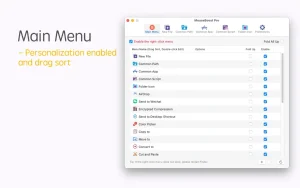
You can reorder, disable, or rename any menu item and pin your most-used actions to the main menu for lightning-fast access tailoring MouseBoost Pro to your exact needs.
Price: $6.99 (one-time purchase) Compatibility: macOS 10.11 or later
Whether you’re a developer, designer, or everyday Mac user, MouseBoost Pro 5.1.0 is one of those tools that once you start using it, you’ll wonder how you ever managed without it.

Tinderbox v11.7.0 for Mac

Ocean Swift Sound Creator Suite 1.9.0 for Mac

LightWave 3D v2024.1.0 for Mac
About Author
