Soulver 3.16.2 for Mac
Soulver 3.16.2 for Mac
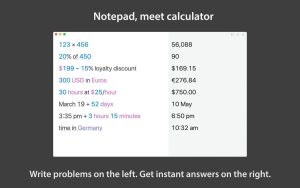
Soulver 3 is a smart notepad with a built-in calculator. It provides instant answers to any calculations it finds in your text. It’s a better way to work than with a traditional calculator and a simpler tool for quick calculations than a spreadsheet.
Mathematical functions:
Instant payments
Use words next to numbers to make calculations make sense
Quick totals of all your rows and subtotals
Calendar calculations (June 9 + 3 weeks, 15:35 + 6 hours 27 minutes)
Simple interest (“300 – 10%”, “30% of 200”)
Converting units of measurement (“10 kg to pounds, “25 meters to feet”)
168 in real time and cryptocurrencies.
Link line for creating small billing documents
Variables and variable autocompletion
Global variables and user units
Application features:
Dark mode
A sidebar for organizing your sheets and the ability to create folders
Headers (#), comments (//), and labels (:)
Customize your syntax coloring and font
Automatic number formatting with spaces around operators and thousands separators
Clear a number (hold down the Shift key and hover over the number)
Deep integration with macOS: Touch Bar support, quick view, and Calculate Anywhere services
Automation tools: CLI, Alfred workflow, Automator action
Soulver 3.16.2 bThe Smarter Way to Do Math on Mac
Soulver is one of the most thoughtfully designed productivity apps on Mac, and version 3.16.2, released on May 17–18, 2026, by Acqualia, adds a handful of genuinely useful natural language improvements that make the app even more intuitive to use daily.
What is Soulver?
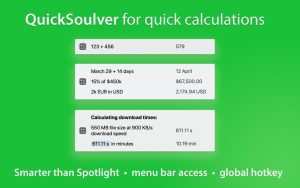
Soulver sits squarely between a basic calculator and a full spreadsheet faster and more natural than Excel for quick calculations, and far smarter and clearer than macOS’s built-in Calculator. You type out problems in plain English on separate lines and Soulver calculates the answer live as you type. You might write “20% of $899”, “March 12 + 3 weeks”, or “10am New York to London time” and get an instant answer on the same line. Previous lines can feed into later ones like a lightweight spreadsheet, and you can name values as variables for more structured calculations. A running total at the bottom sums everything up, and headings and comments help organize longer budgets or project estimates. It supports 300 plus unit conversions, live currency and crypto rates, percentages, time zones, and date math all in plain language without cryptic key sequences.
What’s New in 3.16.2
This update adds three practical natural language improvements. First, Soulver can now calculate sunrise, sunset, and daylight hours by place type something like “sunrise in Tokyo” and get the answer for today. Second, quarter-based date phrases are now supported, so expressions like “next quarter” or “end of this quarter” resolve correctly in date calculations. Third, superscript exponents are now recognized writing 100² works exactly as you would expect. An edge case bug in exponent calculations has also been fixed in this build.
Earlier in the 3.16 series, Soulver added support for compound feet-and-inches expressions using “and”such as “5 feet and 3 inches in cm” along with 119 additional tourist-destination cities and airports for time zone and travel calculations. Japanese, Korean, and Italian localizations were also added, broadening the app’s reach significantly.
Multiple Sheets and iCloud Sync
Soulver supports multiple sheets organized into folders, iCloud sync across Mac and iPhone, and full import of old Soulver 2 files for users upgrading. The Mac and iPhone editions work together seamlessly, so calculations you start on your phone are waiting for you on your Mac.
Pricing
Soulver is a one-time purchase at $39 directly from acqualia.com, with a free trial available before buying. It is also available through Setapp. It requires macOS 13.5 or later and runs natively on both Intel and Apple Silicon Macs.

Moomintroll Winter Warmth 0.1.128 for Mac
![4K Wallpaper – HD Wallpapers v2.9 [MAS] for Mac](https://appmacs.com/wp-content/uploads/2026/05/4K-Wallpaper-–-HD-Wallpapers-v2.9-MAS-for-150x125.png)
4K Wallpaper – HD Wallpapers v2.9 [MAS] for Mac

Moom 4.5.1 for Mac
About Author
