Octavo 1.1 for Mac
Octavo 1.1 for Mac
Octavo is an app that transforms the process of creating booklets, brochures, mini-zines, and business cards from a page-calculating puzzle into a simple and straightforward task. Simply upload a PDF file, and Octavo automatically calculates the page order for double-sided printing, adds fold and staple marks, and prepares the sheets for printing.
If you’ve ever tried to print a booklet and weren’t sure how to arrange the pages, or spent a battle with the printer settings, ruining half a ream of paper, Octavo is for you. The app was born from a real-life problem the developer encountered: after updating their laser printer, they discovered that the “booklet printing” option was missing from the new driver.
Peculiarities:
• Booklet creation made easy. Create booklets with staples and automatic page ordering. Simply upload a PDF file, and Octavo will automatically calculate the layout.
• Single Sheet Mini Zines Fold a single sheet of paper into an 8-page self-published or accordion-style zine. Perfect for handouts, art projects, and quick publications.
• Business cards and labels Lay out business cards or labels on standard-sized sheets of paper. Arrange the rows, columns, and spaces according to the paper type.
• Eliminate clutter in your PDFs. Correct page size mismatches, align distorted scans, and precisely position pages. You can even apply filters for monochrome, sharpening, and noise reduction.
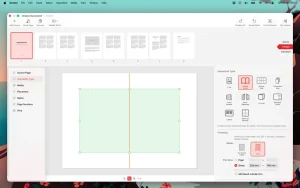
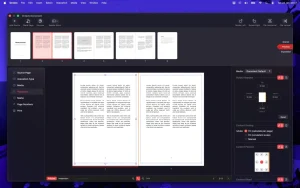
• Live Preview See exactly how your assembled pages will look before printing. Adjust settings and watch the layout update in real time.
• Printer’s Marks and Page Numbers Add crop, fold, and registration marks. If desired, number pages for ease of assembly.
• Manage your printer Adjust duplex printing settings, view non-printable margins, and manage trays and paper supplies.
Octavo 1.1 Booklet Printing and PDF Imposition for Mac
Printing a booklet from a PDF sounds simple until you actually try it pages come out in the wrong order, margins get clipped by the binding, and half a ream of paper ends up in the bin. Octavo, from indie studio Double & Thrice, was built to fix exactly that problem. Version 1.1 is the latest update to this focused and well-crafted Mac app that launched in early 2026.
What is Octavo?
Octavo is a PDF imposition and booklet printing tool built exclusively for Mac. Drop in a PDF or a set of images, choose your booklet format, and Octavo automatically calculates the correct page order for duplex printing so when you fold and staple the pages, everything lands exactly where it should. It handles saddle-stitch booklets, mini zines, and other folded formats, adding fold marks, staple marks, crop marks, and registration marks as needed. Page numbers can be added automatically for easy assembly.
Beyond printing, Octavo doubles as a light PDF cleanup tool. You can rotate, flip, straighten skewed scans, adjust perspective, and crop pages using visual on-canvas editors. Mismatched page sizes can be fixed, and filters for monochrome conversion, sharpening, and noise reduction are built in. Margins are fully manageable with inside and outside settings so content never gets swallowed by the binding. Per-page scaling fine-tuning is also available for tricky layouts.
Print and Export
Octavo integrates deeply with the macOS printing system. It detects and enforces duplex settings automatically, supports manual duplex workflows for printers without auto-duplex, and lets you assign specific paper trays and media types to different pages card stock for covers, lighter paper for interior pages, with automatic blank sheet insertion to keep media aligned. You can also export to PDF in either a reader preview or fully imposed output, and preview exactly how imposed pages will look before sending anything to the printer.
What’s New in 1.1
Version 1.1 adds printer’s marks and page numbers crop marks, fold marks, and registration marks can now be added to output, and optional page numbering makes physical assembly easier. The app also now proudly sports a Liquid Glass user interface for macOS Tahoe, alongside an offline user manual accessible through the Help menu, which is a thoughtful touch rarely seen in small indie apps.
Pricing
Octavo is a one-time purchase at $24.99 with no subscription a deliberate choice by the developer. A free Lite version lets you try everything before buying, though printed pages carry a small banner until you unlock. Mini zines are completely free with no purchase needed. It requires macOS 15.6 or later and runs natively on Apple Silicon and Intel Macs.



About Author
