Noir – Dark Mode for Safari 2026 1.6 for Mac
Noir – Dark Mode for Safari 2026 1.6 for Mac
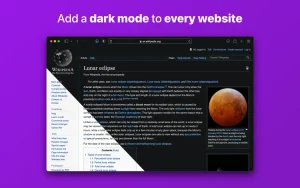
Noir is a Safari extension that automatically adds dark mode to every website you visit.
This makes browsing the web at night much better. With Noir, you’ll never be blinded by bright websites again.
And the results look great, too. Noir creates a custom dark mode for every website you visit based on the colors used on the page. You won’t even notice it happening in the background it’s that fast—but you’ll certainly appreciate the end result: a beautiful dark mode tailored to each website, where contrast is preserved and highlights stand out.
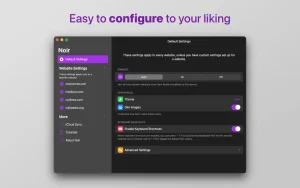
Noir automatically works with any website you visit in Safari. By default, Noir is paired with your device’s dark mode, so websites will only turn off dark mode when you want them to. But you can easily customize this, even on a website-by-website basis. Want to use Noir only on a few specific websites? Sure! Disable Noir on certain websites? No problem!
The app feels right at home on your device. It’s a Safari extension, meaning you don’t have to manually activate it every time you load a new page. The app also tightly integrates with system features like Shortcuts to seamlessly integrate Noir into all your workflows. And your settings automatically sync across all your devices via iCloud.
And just as importantly, Noir takes your privacy seriously: it doesn’t collect any data about your browsing activity. Period.
Noir – Dark Mode for Safari 2026.1.6 — Mac
If you use Safari in dark mode but still get blasted with bright white websites, Noir is the fix. It is a Safari extension that automatically applies a dark theme to every website you visit no manual toggling, no fiddling around. It just works.
How It Works
Noir generates a custom dark style for each website based on the colors already used on that page. So instead of a generic dark overlay, every site gets its own tailored look where contrast is preserved and important elements still stand out. By default, Noir is linked to your device’s Dark Mode, so websites only go dark when your system does. You can also override this per site force dark on some, leave others untouched. AppleInsiderAppleInsider
What’s New in 2026.1.6
Build 2026.1.6 is a compatibility-focused update with another batch of website fixes and improvements driven by user reports. If a site still looks off, there’s a built-in report flow so the developer can target it in a future release. Earlier 2026 updates brought bigger changes a redesigned app with a Liquid Glass look for macOS Tahoe, a refreshed Noir menu in Safari, and the ability to add a Noir toggle directly to your Control Center or menu bar. Softonic
Advanced Options
Enable Advanced Settings in the companion app to unlock per-site fine tuning from the Safari menu: disable dynamic color shifts on stubborn pages, hide background images when they break readability, and turn off image inversion where photos should stay natural. MacTorrents
Privacy and Pricing
The developer states Noir does not collect browsing data settings stay on your device and in your iCloud account. Noir is a one time App Store purchase with Family Sharing, not a subscription. It requires macOS 12.0 or later.

HextEdit 1.0.7 for Mac

Parallels Desktop 27.0.0-58597 (Beta) ARM only for Mac

BatchPhoto Pro 5.1.1 for Mac
About Author
