BetterTouchTool 6.521 for Mac
BetterTouchTool 6.521 for Mac
BetterTouchTool helps you fully customize and fine-tune your Mac’s input process. This includes keyboard shortcuts, mouse movements, Touch Bar widgets, remote triggers, and more. The app isn’t just a simple control point for all of the above it truly extends the Mac’s native capabilities, allowing you to create the most comfortable workspace.
BetterTouchTool Key Features
Use all input devices
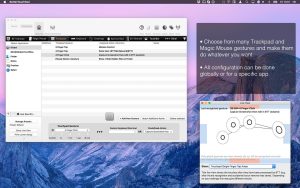
BetterTouchTool’s most unique feature is its list of controlled input devices. To achieve precise execution of the required actions, use a trackpad, Magic Mouse, regular mouse, keyboard, Touch Bar, iPhone or iPad (with BTT Remote), as well as Siri and the Apple Remote.
Customize the Touch Bar
BetterTouchTool lets you reimagine the Touch Bar and give it the look you desire. Your Touch Bar can include unique triggers that perfectly complement your work style: from fine-tuning existing configurations to creating new function keys and even defining the spacing between elements on the bar.
Create any keyboard shortcuts
Forget Command + C! The limited set of hotkeys you use every day is reducing your productivity. With BetterTouchTool, you can not only save new extended keyboard shortcuts for any device, but also create unique combinations, movements, gestures, and even drawings to replace the default options.
Target specific apps
Sometimes you want to use convenient keyboard shortcuts differently in different apps. BetterTouchTool lets you do just that. For each created shortcut, you can assign apps in which it will work and in which it will be disabled. This opens up a wealth of options for repurposing your keyboard for specific apps.
Save with clipboard manager
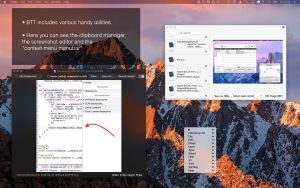
Beyond simply replacing existing keyboard shortcuts with new ones, using BTT gives you access to several advanced features, such as a built-in clipboard manager for copying multiple items simultaneously and a powerful screenshot tool that lets you adjust your images on the fly. These are at least two additional apps you don’t need to install.
Write your own widgets
If AppleScript, custom URL schemes, and working with web servers using HTTP requests are your daily hobbies, you can apply your skills to BetterTouchTool to create your own widgets for the Touch Bar. Among the most popular are cryptocurrency trackers, weather forecasts, and stock market price movements.
What’s New in 6.521
This build ships one targeted bug fix on top of the massive 6.493 update from earlier in May:
- Fixed long-press mouse triggers misfiring when “Tap to Click” is enabled on a trackpad
Everything else carried over from 6.493, which was one of the biggest BTT releases in years:
- New Launcher a Spotlight replacement you can trigger from any shortcut, with app search, file browsing, clipboard history, AI chat, emoji, timers, and a natural language calculator
- Mouse gesture reliability critical long-standing bug finally fixed, gestures now much more consistent
- Background automation control apps without switching focus or moving your real cursor
- BTT Mobile free iPhone/iPad companion app to control your Mac remotely
- AI assistant support ChatGPT, Claude, local models via Ollama; all optional and off by default
- Apple TV Remote control any Apple TV directly from your Mac
- Smooth scrolling improvements standard mice now feel far better on macOS
The New Launcher
The biggest single addition this cycle is the Launcher a fully configurable Spotlight alternative. Search apps, files, BTT actions, calendar events, reminders, clipboard entries, and AI conversations all from one place. It supports fuzzy matching and learns your habits over time, ranking results based on what you actually use. Type “1h 30min + 45min” or “55 USD + 33%” directly into the Launcher and get an instant answer powered by Soulver’s natural language engine.
Pricing
A 45-day fully functional trial is available with no credit card required. After that, a Standard licence costs around $15 and covers two Macs with two years of updates. A Lifetime licence is around $25 for ongoing updates on two Macs one of the best deals in Mac software. BTT is also included in Setapp. It is not on the Mac App Store; download directly from folivora.ai or via Homebrew.


About Author
