Typeface 4.3.1 for Mac
Typeface 4.3.1 for Mac
Choosing the right font is vital to the success of any design project. But it’s often more difficult than it seems. Sure, we can almost always tell when Comic Sans won’t cut it. But few of us can intuitively discern when Gill is needed and when Gill Sans. That’s where Typeface comes in. Think of this easy-to-use font manager as a dressing room, where you can preview fonts for your projects and compare them side by side. Built with a customizable library, this app lets you preview fonts at any size, display, or against any text. Whether for business or pleasure, Typeface is a great way to manage and browse font collections to enhance your work.
Flexible font libraries
By default, the app shows you all the fonts installed on your Mac, including custom ones. Most are designed to work across multiple platforms, so you can be sure your work will look consistent on both your computer and mobile device. Fonts can even be grouped by family, so you can find the ones you’re interested in and then compare them with similar ones.
Customizable display
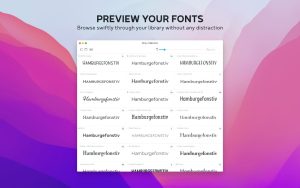
With Typeface, you’ll gain complete control over your fonts’ appearance, comparing them instantly. Adjust size, sample text, weight, and other effects in real time, getting a precise layout of how fonts will appear in your project. Compare individual words and entire sentences in all available fonts, quickly choosing the best option.
Detailed metadata
Click on any font and you’ll find all the information you need to make an informed choice. Each font’s page displays a full set of letterforms, uppercase and lowercase, as well as numbers and special characters. You can view metadata in the info tab, which also includes the copyright history and any tags or groups assigned to the font. This gives you a general overview of any font at any time.
Simple instant comparison
This app makes it easy to compare font options for any project using a seamless grouping system. This feature helps you collect and compare potential fonts across different pages for easy review. The workspace lets you add and remove fonts with a click, focusing on the top contenders. Moving on to the next project? Simply clear your selection and start again.
Typeface 4.3.1 for Mac The Font Manager Every Designer Loves
Fonts are the soul of design and managing hundreds of them shouldn’t be a chore. Typeface by Floor Steeg is the most beautifully crafted font manager on macOS, trusted by designers, typographers, and creative professionals worldwide. Version 4.3.1, released on May 20, 2026, brings improved auto activation for design apps, refined language filters, and important bug fixes that make an already exceptional app even more reliable.
What’s New in v4.3.1?
Improved Auto Activation for Design Apps Typeface’s auto activation feature which automatically activates the fonts a document needs when you open it has been improved for better compatibility with popular design applications. Open a file in Figma, Affinity Designer, or Sketch and your fonts just work, every time.
Refined Language Filters Language-based font filtering has been refined for greater accuracy making it easier to find fonts that support specific scripts and character sets when working on international or multilingual projects.
Printing & Pairing Studio Fixes Several issues with printing font specimens and the Pairing Studio feature have been resolved keeping your font proofing and pairing workflow smooth and reliable.
Why Designers Love Typeface
Beautiful Live Font Previews Browse your entire font library with live, customizable previews — change the preview text, adjust the size, and instantly see how any font looks in real-world contexts like books, magazines, websites, or business cards. No more guessing see exactly what you’ll get.
Pairing Studio Finding fonts that work beautifully together is an art and Typeface makes it science. The Pairing Studio lets you experiment with font combinations side by side, comparing headings with body text until you find the perfect typographic match for any project.
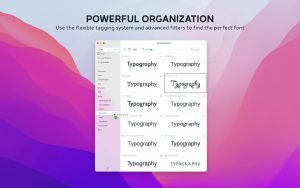
Smart Collections & Tags Organize your fonts into custom Collections and tag them by style, mood, project, or client. Find exactly the right font in seconds no matter how large your library grows.
Powerful Filters Filter fonts by language, weight, style, category, foundry, or tag narrowing down thousands of fonts to exactly the right candidates for any design challenge.
Auto Activation Typeface integrates with popular design apps so fonts are automatically activated when needed no manual hunting through Font Book before starting a project.
Font Activation & Deactivation Keep your system lean by activating only the fonts you need, when you need them. Deactivate everything else to keep your Mac’s font list clean and your apps running fast.
Variable Font Support Typeface fully supports variable fonts explore the entire design space of a variable font with smooth, interactive sliders in the preview panel.
Pricing & Compatibility
- Price: $51.59 one-time purchase from typefaceapp.com or the Mac App Store
- Also available via Setapp subscription
- Requires macOS 12 or later Universal Binary
- Supports both Apple Silicon and Intel Macs 27.9 MB



About Author
