Monocle 3.5.1 for Mac
Monocle 3.5.1 for Mac
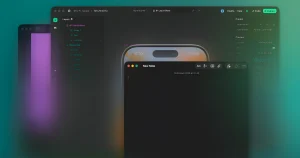
Monocle is a minimalist utility designed to increase productivity by reducing visual clutter. This app automatically highlights the active program window while dimming all background windows.
Key Features and Functions:
– Window Focus: The app smoothly dims or blurs all background windows, leaving only the active app in focus.
-Display Modes: Supports various focus styles, including gradient fading and full screen mode.
-Integration: Works from the Menu Bar, supports multiple displays, and allows you to exclude specific apps from blur mode
Monocle 3.5.1 for Mac Noise-Cancelling for Your Screen
In a world of endless open windows, notifications, and visual clutter, Monocle does something beautifully simple it dims everything except the one window you’re actually using. Described by its creator as “noise-cancelling for your screen”, Monocle is the elegant macOS menu bar focus utility that helps you stay locked in, one window at a time. Version 3.5.1 is the latest build refining Stage Manager support and expanding Apple Shortcuts integration.
What’s New in v3.5.1?
Stage Manager Blur Toggle Monocle 3.5.1 adds a dedicated Stage Manager blur toggle giving users running macOS Stage Manager precise control over whether the blur effect applies when Stage Manager is active.
Stage Manager Fade Fix A visual bug causing the fade effect to behave incorrectly in Stage Manager has been resolved transitions are now smooth and consistent whether Stage Manager is on or off.
Expanded Apple Shortcuts Scripting Monocle now offers expanded Apple Shortcuts support, enabling power users and automation fans to trigger focus modes, toggle effects, and control Monocle through custom Shortcuts workflows hands-free and effortlessly.
How Monocle Works
The concept is brilliantly simple. When you’re ready to focus, Monocle keeps your active window sharp and clear while everything else on screen fades, blurs, tints, gains grain, or shifts to monochrome all in the background, without closing or moving a single app.
Trigger it your way:
- Cursor shake a quick shake of your mouse instantly activates focus mode
- Menu bar toggle one click from the menu bar
- Keyboard shortcut your own custom hotkey
- Apple Shortcuts automate it into any workflow
Visual Effects to Choose From
Monocle offers a stunning range of background treatments:
- Blur soft gaussian blur on all non-active windows
- Tint gentle color overlay to desaturate distractions
- Grain subtle film grain texture for a cinematic feel
- Monochrome convert background windows to grayscale
- Gradient dimming smooth fade from active to inactive areas
- Opacity control fine-tune exactly how strong the effect is
Each effect can be fully customized strength, color, and timing so Monocle matches your personal taste perfectly.
Why It Works
Visual clutter is a real productivity killer. Even apps you’re not using drain mental energy just by being visible. Monocle solves this without forcing you to minimize, hide, or rearrange anything. Your other apps stay running and ready you just can’t see them screaming for attention.
Pricing & Compatibility
- Available on the Mac App Store
- Requires macOS 13.0 or later
- Supports both Apple Silicon and Intel Macs


![NetWorker Pro v11.0.11 [MAS] for Mac](https://appmacs.com/wp-content/uploads/2026/06/NetWorker-Pro-v11.0.11-MAS-for-200x125.jpg)
About Author
