PhotoSweeper 5.5.5 for Mac
PhotoSweeper 5.5.5 for Mac
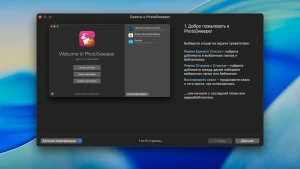
PhotoSweeper is a fast, accurate, and highly effective tool for removing similar or duplicate photos, even from large photo collections. It works with photos from Apple Photos, iPhoto, Aperture, PhaseOne Capture One, and Adobe Lightroom libraries, as well as photos from your hard drives and external storage devices.
PhotoSweeper will help you if:
• You take a series of pictures of the same scene, trying to achieve the perfect result.
• You edit your photos using programs like Photoshop, Pixelmator, etc. and make backups just in case.
• You have photos scattered across external hard drives and local drives, in your Apple Photos, iPhoto, Aperture, or Lightroom libraries.
• You have a cluttered photo collection or you just want to free up disk space by deleting unnecessary photos.
Functions:
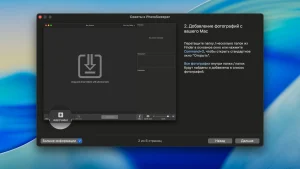
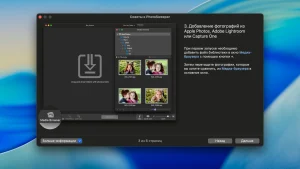
• Easily search for photos. Simply drag and drop folders from your Mac and PhotoSweeper can find all the photos inside. Add more photos from your iPhoto, Aperture, or Lightroom library using the Media Browser window.
• Flexible comparison settings. Powerful multi-settings make it easy to find duplicates, similar photos, and photo series. The app finds duplicate photos, even those edited in external programs like Photoshop, regardless of size or format.
• High speed and quality PhotoSweeper was designed to compare huge numbers of photos extremely quickly. Advanced technologies and unique algorithms make duplicate search incredibly fast and produce excellent comparison results.
• Efficiency. You can rearrange the results without re-comparing photos by adjusting the match level using the slider. Using caches significantly speeds up the next comparison.
• Automatically mark duplicates Manually mark photos you want to get rid of, or use the Auto Mark feature to automatically mark duplicates based on a list of rules that you can customize to suit your needs in the settings.
• Comfortable viewing of results – PhotoSweeper provides 3 modes of viewing results: “One by one”, “Face to face” – one or two large photos with the ability to mark a photo with one click, “All in one” – all groups of duplicates in one list.
• Excellent photo viewing PhotoSweeper also serves as a modern photo browser with built-in photo search by metadata, Quick Look preview, Info panel with detailed photo descriptions including histogram and image metadata (EXIF, IPTC, etc.)
PhotoSweeper 5.5.5: Keeping Mac Photo Libraries Clean and Clutter-Free
PhotoSweeper, developed by Overmacs, is a native macOS utility built to find and remove duplicate and similar photos across large libraries. Rather than relying on filenames, it compares actual image content, which means rotated exports, resized edits, and burst-series shots all get grouped together correctly for review.
How It Works
Users point PhotoSweeper at a source an Apple Photos library, Adobe Lightroom Classic catalog, Capture One session, a folder, or an external drive and choose a search mode for exact duplicates, similar photos, or timed series of shots. Similarity thresholds can be adjusted to control how strict the matching is. Results appear in side-by-side review layouts with Quick Look previews, EXIF details, and marking tools, so nothing gets removed blindly. Auto Mark applies customizable rules, including an AI-powered Quality Score, to automatically keep the sharper or higher-rated photo in each group while leaving locked photos untouched. Deletions are conservative by design: files typically move to the system Trash, get flagged as Rejected in Lightroom, or land in a dedicated recovery album in Photos.
Version 5.5.5
This build is listed as the current Mac App Store release, though Overmacs’ public changelog groups its changes under the broader 5.5.x update line rather than publishing a separate note for this specific patch. That line of updates has focused on refining pro workflows, including support for reading metadata from XMP sidecar files, improved handling of Adobe DNG images, better Lightroom preview imports, and new options to ignore hidden Apple Photos items or rejected Lightroom images.
Format Support and Requirements
The comparison engine supports common formats including JPEG, HEIC, PNG, TIFF, RAW types like DNG, plus PDF and WebP, along with several video formats. Builds are optimized for both Apple Silicon and multicore Intel Macs, requiring macOS 10.15 or later.
Pricing
PhotoSweeper is sold as a one-time purchase on the Mac App Store for $14.99, with Family Sharing support, and a trial build is also available from the developer’s own site.
![4K Wallpaper – HD Wallpapers v2.9 [MAS] for Mac](https://appmacs.com/wp-content/uploads/2026/05/4K-Wallpaper-–-HD-Wallpapers-v2.9-MAS-for-150x125.png)


About Author
