Disk Graph 3.2.1 for Mac
Disk Graph 3.2.1 for Mac
Disk Graph is a tool that lets you check your disk and easily find files that are taking up the most space. With its beautiful interface and circle-shaped graph, locating large files has never been easier.
Explore your drive and find files that take up the most space or haven’t been changed in a while.
You can open any directory that is available in Finder.
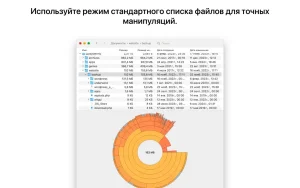
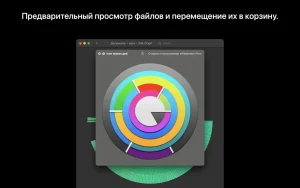
Use the context menu or keyboard shortcut to show selected files in Finder or move them to the Trash.
Open two or more similar catalogs to watch them change in interactive animation mode, or take snapshots at key moments to compare them later.
Disk Graph 3.2.1 for Mac: A Small Fix Release
Disk Graph, the Mac disk-space visualizer built by developer Nicolas Kick (Desairem), released version 3.2.1 on June 30, 2026. It’s a minor maintenance update, following the more feature-heavy 3.2.0 release.
What Disk Graph Does
Disk Graph helps you find what’s eating up space on your Mac. Instead of digging through Finder folder by folder, it scans any directory — a local drive, an external drive, or even a remote server and displays the results as an animated, pie-style graph. You can drill into subfolders, hover over files to see their size, and use the context menu to reveal files in Finder or send them straight to the Trash.
The app also supports comparing directories side by side, exporting snapshots of a scan to review later, and saving frequently used locations as favorites for one-click access.
What’s New in 3.2.1
This release is focused on fixes rather than features:
- Corrected date display: Fixes wrong creation and modification dates that were showing up for Macintosh HD in the file list.
- Crash fix: Addresses an occasional crash that had been reported in earlier builds.
Both fixes carry over the improvements introduced in version 3.2.0, which added macOS 26 compatibility, better accessibility support (increased contrast, reduced transparency, and reduced motion options tied to system Accessibility settings), and fixes for a rendering glitch with the “Show Available Space” option and folders collapsing unexpectedly during search.
Versions and Pricing
Disk Graph is available in two forms:
- Disk Graph Lite (Mac App Store): Free, but disables saved favorites, Finder reveal, and Trash actions good for testing the app before buying.
- Full version (developer’s website): A one-time lifetime purchase with free updates, no subscription, and support for both Intel and Apple Silicon Macs.
System Requirements
Disk Graph 3.2.1 requires macOS 10.13 or later and runs natively on Intel and Apple Silicon hardware. The app is available in more than thirty languages.

Zenteek 1.4.8 for Mac

Serato DJ Pro Suite 4.0.5 for Mac

RAR Extractor – Unarchiver Pro 6.6.1 for Mac
About Author
