Screens 5.8.10 for Mac
Screens 5.8.10 for Mac
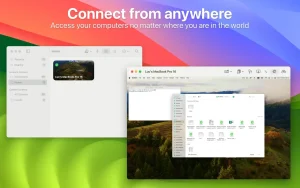
Screens – this is access to your computer from anywhere in the world.
Need to finish a presentation, but the file is still on your home computer? Does the software on a remote server require an urgent update? Have your parents asked you to help set up your computer, but you still don’t have time to visit?
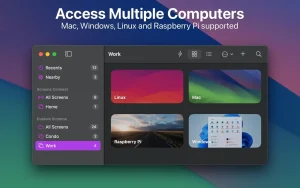
Screens lets you work with your Mac, Windows/Linux PC, or Raspberry Pi from anywhere in the world, just like you would at home.
PECULIARITIES
• Access from anywhere
Install Screens Connect on your Mac or Windows computer and connect to it from anywhere.
• Curtain Mode
Hide your Mac screen from the remote user when needed.
• File transfer
Copy files from one Mac to another with a simple drag and drop.
• Secure connection
Screens can connect to your computer via a secure channel.
• Flexible organization of sessions
Connect to your computer with your credentials or initiate a shared session with another Mac user.
• Multiple display support
Do you have more than one display connected to your Mac? Screens lets you choose which one to display (or display all).
• Shared clipboard
Share text, links, and images using local or remote clipboards. Screens can sync data between them when needed.
• Touch Bar support
Convenient, customizable shortcuts that are always at hand.
• Groups
Organize saved screens into groups.
• Helping relatives, friends and colleagues
Install our free Screens Express app for your parents or friends and connect to their Mac to help them troubleshoot issues, update the app, etc.
OTHER FEATURES
• Enter your password with one click
• Synchronize data via iCloud or Dropbox
• Adaptive quality
• URL scheme support (RFC 2396)
• SSH keys support
• Computer monitoring and control modes
• Active angles
• Ability to send specific commands to the computer before disconnecting the connection
• And much, much more!
Screens 5.8.10 for Mac: A Quick Look
Screens is a well-known remote desktop app for Mac, developed by Edovia, that lets users connect to and control other computers over the internet or a local network. The 5.8.10 release is a maintenance update to the Screens 5 lineup, which brought a fully redesigned, universal app experience across Mac, iPhone, and iPad.
What Screens Does
At its core, Screens is a VNC client, meaning it lets you view and control a remote computer’s screen as if you were sitting in front of it. This makes it useful for:
- Accessing a home or office Mac while traveling
- Managing a headless Mac mini or server remotely
- Helping friends or family troubleshoot their computers
- Picking up files left on another machine
Screens works across Macs, Linux systems, Raspberry Pi devices, and Windows PCs (with a VNC server like TightVNC or UltraVNC installed on the Windows side).
Key Features
Secure Connections: Screens uses SSH tunneling to encrypt sessions, and supports custom SSH keys for added authentication. Sessions can also be locked behind Touch ID, Face ID, Apple Watch, or a password.
Screens Connect: A built-in feature (as of version 5.8.8 and later, on macOS 14+) that makes a Mac reachable from anywhere without needing a separate helper app. Earlier versions require installing the standalone Screens Connect utility.
Curtain Mode: Blacks out the display on the remote Mac during a session, so anyone near that machine can’t see what’s happening on screen — useful for privacy in shared spaces.
Gestures and Controls: Multi-touch gestures, support for hardware keyboards and trackpads, and a customizable toolbar for quick access to modifier keys, clipboard, and system controls.
File Transfers: Drag-and-drop file transfer between devices, with transfers continuing in the background even if you switch apps.
System Requirements
Version 5.8.10 requires macOS 14 or later, and runs natively on both Apple Silicon and Intel Mac hardware.
![ConceptDraw Office v11.0.0.1 [TNT] for Mac](https://appmacs.com/wp-content/uploads/2026/05/ConceptDraw-Office-v11.0.0.1-TNT-for-Mac-logo-200x125.png)


About Author
